
By Daily Carry Lab. Primary documentation checked October 14, 2026 (Pacific).
Affiliate disclosure: As an Amazon Associate, Daily Carry Lab earns from qualifying purchases. Retailer links may earn a commission at no extra cost to you. Manufacturer links support the documented claims.
Research disclosure: We have not tested these products. Selection is based on primary documentation and the compatibility decisions below; no DCL ratings or measured performance are claimed.
Start with the books you want to read. Kindle Paperwhite (12th generation, 2024, 16 GB) is a candidate for a Kindle-centered library; Kobo Clara BW is a candidate for native EPUB files and supported library borrowing. A larger screen or a waterproof label cannot resolve a book ecosystem mismatch. We chose these two documented black-and-white readers to compare that decision, rather than declare a screen-quality winner or claim they are the newest releases.
Check three real books before choosing
Pick one book you bought, one you might borrow and one document you want to carry. Establish the authorized download or delivery method for each. File extension, account ownership and reading rights are separate checks: a file named EPUB can still be protected by a system the destination reader cannot use.
Kobo lists EPUB and EPUB3 among Clara BW’s native formats. Its support page explains that Adobe DRM books require Adobe Digital Editions for transfer to a Kobo eReader. That is a specific workflow, rather than a promise to open any purchased book from another store. Kobo format support.
The Paperwhite manual says personal documents including EPUB can be sent to Kindle and read in Kindle format; it separately identifies PDF and TXT as native formats. Do not interpret Send to Kindle accepting an EPUB as proof that an arbitrary protected EPUB can be copied by USB and opened unchanged. Try a permitted sample through the documented method first. Paperwhite 12th-generation manual.
| Reading task | Kindle Paperwhite 12th generation | Kobo Clara BW |
|---|---|---|
| Kindle-store library | Check delivery through your Amazon account | Do not assume Kindle purchases transfer directly |
| Permitted EPUB personal file | Send to Kindle workflow; read in Kindle format | Native EPUB support; rights protection still matters |
| Adobe DRM library download | No compatibility established here | Adobe Digital Editions workflow documented for Kobo eReaders |
| Page-layout PDF | Manual documents native PDF reading | PDF format supported; try actual layout on the smaller screen |
The PDF row is a compatibility statement, not a claim that either device is comfortable for every textbook, map or scan. Examine the actual page rather than using file-format support as a readability score.
Library borrowing depends on the service and region
Libby’s current help page says most Libby books can be read on a Kindle eReader in the U.S. only, using Read With → Kindle and then Amazon’s Get Library Book flow. Not every loan has a Kindle version. Libby Kindle instructions, updated September 3, 2026.
Kobo’s current borrowing instructions include Clara BW in supported devices for its built-in Libby by OverDrive feature. The documented regions include the U.S., Canada, U.K., Australia and New Zealand, among other listed locations. A library card, supported library/catalog and connection are still needed; not every library title exists in the Kobo catalog. Check the complete region list and your library before purchase. Kobo library borrowing instructions.
If library access drives your choice, successfully borrow a representative title through the relevant account workflow before committing to the device. Library availability is not established by your travel destination alone.
Prepare downloaded content before going offline
On Kindle, an item visible in the cloud library is not necessarily downloaded. The manual distinguishes device and cloud storage and explains filtering downloaded content. Airplane Mode disables wireless connectivity. Download and open your intended books before using it. Paperwhite manual.
Apply the same practical preflight check to your Kobo: open each intended book with the connection unavailable and confirm it is present locally. Keep loan deadlines in mind; this check is not a promise to extend a loan or bypass its expiry. Sync and obtain new loans while you have a working connection.
Compare documented carry and charging facts
Amazon identifies this exact Paperwhite generation as a 2024 release with 16 GB nominal storage, approximately 11.5 GB available to the user, USB-C, adjustable warm light and IPX8. It lists up to 12 weeks of battery life. We have not verified a common test condition for a numerical endurance comparison with Kobo, so that rating is not a travel-runtime guarantee. Amazon generation identification.
Clara BW has a 6-inch screen, 16 GB nominal storage, USB-C, and a documented 112 × 160 × 9.2 mm body at 174 g. Its IPX8 claim specifies up to 60 minutes in 2 m of water. Kobo rates up to 53 days under 30 minutes of daily reading, front light at 10%, and Wi-Fi/Bluetooth off. Storage includes software use. Clara BW specifications.
Check your cover and bag opening separately; bare-reader dimensions do not prove a covered device fits. Keep ports dry and follow care instructions. Neither water rating establishes protection for the charging cable, cover or rest of your bag. The tech pouch guide offers a separate organization checklist.
| Exact option | Budget status checked October 14, 2026 | Reason to choose | Drawback |
|---|---|---|---|
| Paperwhite 12th generation 16 GB black, 2024, ad-supported | Current checkout total unknown; no price ceiling | Existing Kindle library and supported U.S. Kindle loans | Selected retailer identity has ads; EPUB delivery is a distinct workflow |
| Kobo Clara BW black, N365-TP-BK-S-EP | Current checkout total unknown; no price ceiling | Native EPUB support and supported built-in library borrowing | DRM, region and title matching still constrain access |
| Keep a suitable reader already owned | No new reader cost if your books work | Test three representative books and offline access first | An older device’s format/features may differ |
Retailer identities checked October 14 are B0CFPJYX7P for the black, ad-supported Paperwhite 16 GB without Kindle Unlimited, and B0D1KV8J76 for Clara BW black. They do not include a verified protective-cover bundle. Verify selected generation, ads and bundle at checkout; a similarly named Signature Edition is a different identity. Choose the reader that opens your actual books through an authorized, workable path.
A waterproof reader still needs a dry charging and carrying plan
For beach or pool reading, Clara BW’s IPX8 label is only part of the decision. Kobo’s water-care guidance, checked October 27, 2026, includes Clara BW and says its waterproof readers are neither dustproof nor sandproof and do not float. A depth rating is not evidence of protection in a sandy bag.
| Planned use | Manufacturer boundary | Kit decision |
|---|---|---|
| Charging after water exposure | Dry the USB port first; do not charge in or near water or high humidity | Arrange a dry charging place |
| Beach, pool or bath | Avoid salt, chlorinated and soapy water, and powerful moving water | Do not use the rating as permission for those conditions |
| Reading with a wet screen | Touch response may differ; dry the screen and hands | Do not diagnose a failed reader from wet touch behavior alone |
| Carrying beside loose sand | No sandproof or dustproof claim | Consider how you will keep debris away |
Kobo instructs owners to rinse a wet reader promptly with fresh water and dry it before use. Follow the exact model’s care instructions; the older Aura H2O port-cover procedure is not a Clara BW feature.
Our buying advice is to choose a reader and carrying routine together. A cover’s protection and packed fit need their own evidence. Current cover or replacement costs are unknown. We have not performed immersion, sand or touchscreen tests, and these Kobo instructions do not establish equivalent Paperwhite care.
Check the computer fallback before relying on it
If your travel plan depends on a laptop loading the reader, distinguish the Kobo Desktop application from a USB file connection. Kobo explicitly excludes Clara BW from Kobo Desktop compatibility. Its generic Desktop-sync instructions therefore do not provide a fallback for this selected reader. Kobo Desktop compatibility note, checked October 21, 2026.
| Planned task | Check before departure | Consequence |
|---|---|---|
| Synchronize Clara BW using Kobo Desktop | Clara BW is explicitly excluded | Choose another supported content workflow before buying for this purpose |
| Connect by USB for a permitted file workflow | Use a data-capable cable and tap Connect when Computer detected appears | A cable that charges does not necessarily transfer data |
| Diagnose a missing USB connection | Kobo recommends removing USB hubs and connecting directly to the computer | Test the direct path before blaming the reader or buying another hub |
Kobo’s USB troubleshooting instructions support the latter checks. Successful detection still does not establish book-format or DRM compatibility. Prepare a permitted sample and open it on the reader using the relevant workflow above. We have not tested a particular laptop, cable or operating-system combination, and this does not establish equivalent USB behavior for the Kindle.
Protected books add an authorization dependency
If the Clara BW purchase depends on books from a different store or a library download, check authorization before ordering. Kobo’s current Adobe Digital Editions instructions, checked October 22, 2026, describe a change from Adobe ID to ByteBooks ID for signing into ADE. An already authorized computer or reader can continue until asked to sign in again; do not assume that owning an old Adobe login finishes a new setup.
| Your content path | Preparation to verify | Additional dependency or drawback |
|---|---|---|
| A protected download ending in .acsm | Open it through ADE to obtain the book | The downloaded authorization file is not the finished reading workflow |
| First protected transfer to this Kobo | Authorize both computer and reader in ADE | A cable connection alone is insufficient |
| Existing Adobe-authorized collection | Follow Kobo’s ByteBooks transition guidance when sign-in is required | Kobo advises retaining the same email address for the transition |
| Most Kobo Store purchases or supported direct borrowing | Check the direct workflow first | ADE may be unnecessary; do not add software steps by default |
Kobo describes a Windows or Mac installation, computer authorization, connecting the reader by USB, authorizing it under Devices, and dragging the book to the reader before safely ejecting. This is a separate application from Kobo Desktop: Clara BW’s Desktop exclusion above does not itself establish an ADE exclusion. It also does not prove that your particular operating-system version, loan or protected purchase works.
The buying decision is whether you can support the whole content path: permitted book, provider account, required authorization, suitable computer, data cable and an actual book opening on the reader. Kobo calls ADE free software; current reader, cable and computer totals remain unknown. Buying another reader or cable is not our recommended first response to an account-authorization problem. If the provider requires downloading a title again, obtain it from that authorized store or library.
We have not installed ADE, migrated an account or tested a protected transfer. This section gives no guarantee that every EPUB, PDF or library loan transfers, and it adds no Kindle DRM compatibility. Rehearse with a representative permitted title before departure; a format list by itself cannot settle this ecosystem choice.
Plan audiobook downloads and Bluetooth output before leaving Wi-Fi
For Clara BW, an audiobook plan adds a different preparation task from opening an EPUB. Kobo’s audiobook instructions, checked October 24, 2026, include Clara BW and describe playback to Bluetooth headphones or speakers. The page restricts Bluetooth pairing to those output devices; it does not establish general Bluetooth accessory support.
Kobo describes purchasing an audiobook through Kobo, opening it in My Books and downloading it to the reader. A download icon means Wi-Fi is needed. Its chapter controls warn that some chapters may need downloading before listening. Starting the first chapter therefore does not prove the entire journey’s listening is ready offline.
| Pre-departure check | What to establish | Drawback to include |
|---|---|---|
| Intended audiobook | Available through a documented, authorized delivery path | An existing ebook purchase does not prove audiobook entitlement |
| Later chapters | Download the intended material before losing connectivity | A successful opening is an incomplete offline check |
| Bluetooth output | Pair the actual headphones or speaker | Carry and charge that device too |
| Available reader storage | Compare downloaded files with remaining space | Kobo lists audiobook files from 50MB to 14GB or more |
Our suggested rehearsal is to use the same output device you will take, open the title and check a later intended chapter with Wi-Fi unavailable. Reconnect if downloads remain. This is preparation advice, not a DCL playback test or a way to extend borrowing rights. It supplies no evidence that an audiobook from another provider transfers.
Budget and drawback: include any missing audio device and authorized audiobook purchase in the complete plan; current totals are unknown. If your existing phone already handles the intended listening, compare keeping that workflow before adding reader accessories. We have not measured audio endurance, download speed or Bluetooth reliability. These Kobo instructions do not establish the Paperwhite’s audiobook behavior.
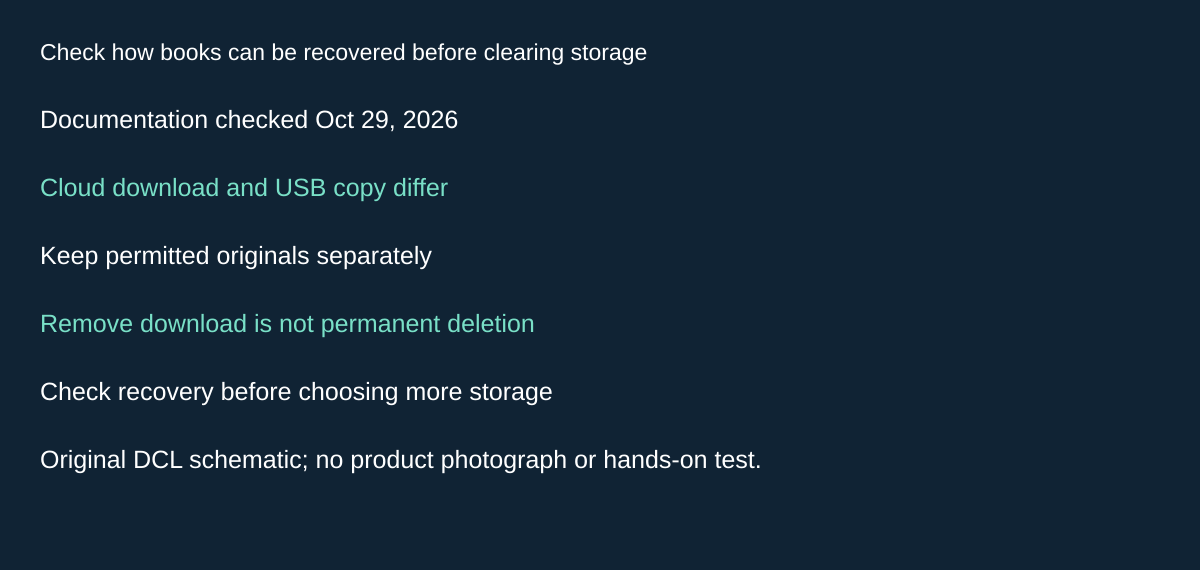
Original DCL research schematic, October 29, 2026; documented boundaries, not a product photograph or test.
Check how books can be recovered before clearing storage
Before buying more reader storage, identify which files you can recover. The Paperwhite 12th-generation manual distinguishes Remove download from Permanently delete. Cloud-backed downloads can be downloaded again, while removing a USB-transferred file deletes the device copy because that file is not in the cloud. Permanent deletion also affects the account and other devices; the manual warns that a title must be repurchased to read it again. Paperwhite manual, Removing items from your Kindle, checked October 29, 2026.
| What occupies space | Check before removing anything | Travel implication |
|---|---|---|
| A cloud-backed download | Confirm it remains in the account and can be obtained again | Recovery still needs the necessary connection and account access |
| A file copied by USB | Keep a separate permitted source copy | Do not assume the reader is its backup |
| An account title you want to keep | Distinguish removal from permanent deletion | Avoid choosing an account-wide action merely to free device space |
| A large audiobook or document collection | Check actual local usage and what must stay offline | Nominal capacity alone does not decide the purchase |
Our preparation advice is to inventory the files needed for the trip and keep authorized originals separately before making changes. Open representative downloaded material without a connection. This is a suggested owner check, not a deletion or recovery test DCL performed, and it does not extend library loans or restore reading rights.
Budget and drawback: a larger reader may be unnecessary if recoverable downloads occupy the space, but we make no capacity recommendation without your actual files. Replacement, repurchase and complete-device totals are unknown. These Kindle removal rules do not establish Kobo deletion behavior. Check each ecosystem’s instructions before changing an account or device library.
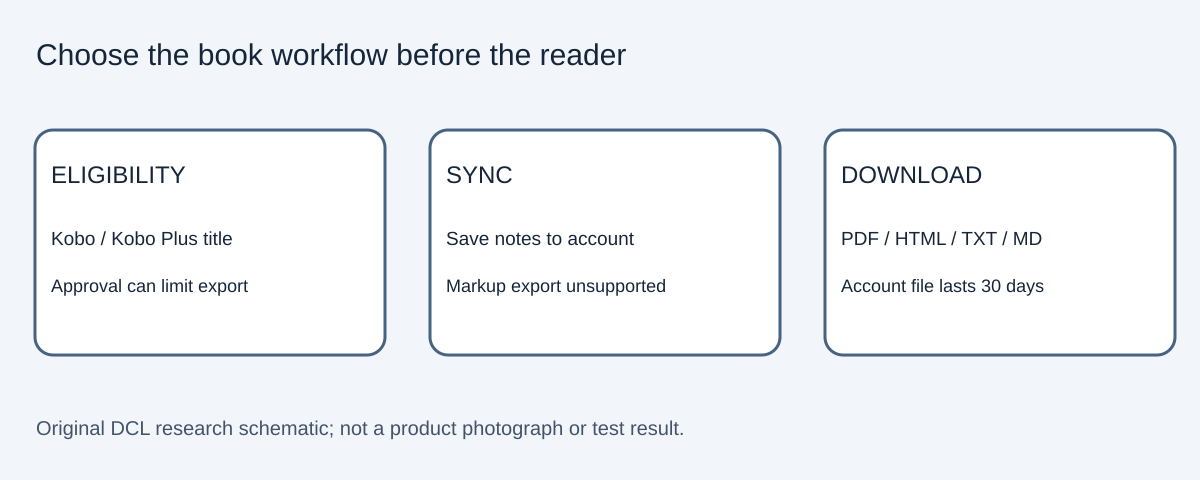
Check note export against your actual book collection
If study notes drive the purchase, check more than book-format support. Kobo’s annotation-export instructions, checked October 30, 2026, cover highlights and notes from Kobo purchases or Kobo Plus. Availability depends on approval for the book; markups are excluded. Do not treat this as proof of export from a sideloaded EPUB or library loan.
| Before choosing the ecosystem | Documented path | Limit to check |
|---|---|---|
| Save notes from the reader or app | Sync to the account | Offline notes have not completed this cloud step |
| Obtain an export | My Books on Kobo.com, then Export Annotations and Generate File | Confirm the intended title offers the action |
| Read notes elsewhere | Download PDF, HTML, TXT or Markdown | Exported account files remain available for 30 days |
Our suggested purchase check is a representative permitted title and the format needed by your note workflow. A successful book download alone does not settle this decision. We have not exported notes, and this source establishes no equivalent Kindle behavior. Reader, book and complete-workflow costs remain unknown. Keep a downloaded copy you need rather than relying on the account’s temporary export file.
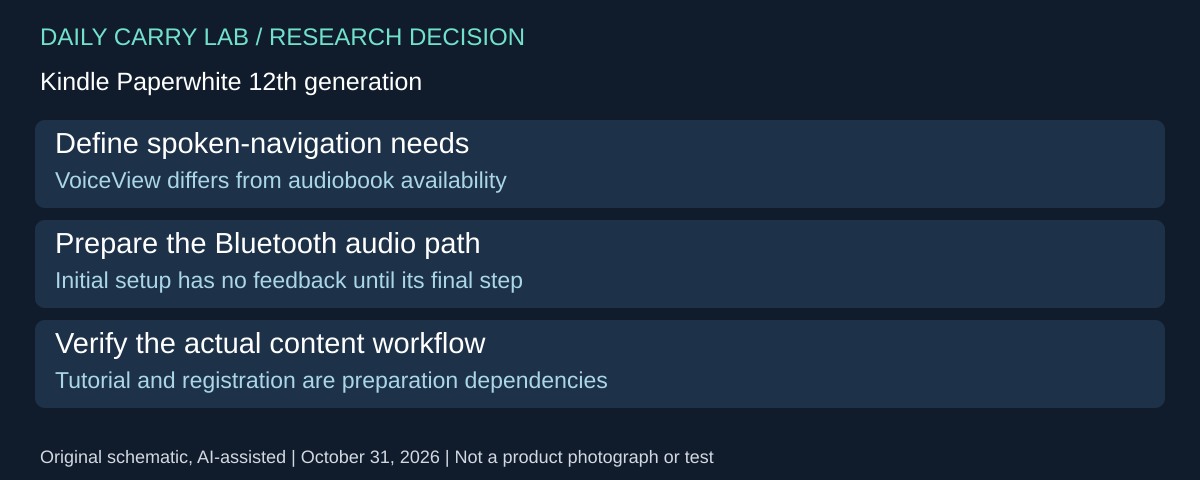
Check spoken navigation before choosing the reading ecosystem
If spoken navigation is a purchase requirement, verify it separately from audiobook availability or book-format support. The Paperwhite 12th-generation user guide, VoiceView screen reader section, checked October 31, 2026, documents VoiceView with a Bluetooth audio device, special navigation gestures and spoken feedback. This adds a different ecosystem decision from the note-export and protected-book workflows above.
| Preparation need | What the guide documents | Dependency to accept |
|---|---|---|
| Initial spoken-navigation setup | Pair a Bluetooth audio device and initiate VoiceView | Guide says there is no spoken feedback until the final setup step |
| Learn the interaction | First successful activation starts a tutorial | Familiar touchscreen use is not proof the gestures meet your needs |
| Resume after setup | Turn on the audio device before waking Kindle, then initiate VoiceView | Check reconnection with the audio equipment you carry |
| Complete reader setup | Wireless connection and Kindle registration prompts | Plan initial access before relying on the device away from home |
The instructions include waiting 45 seconds after powering on, putting the audio device in pairing mode, pressing Power three times and confirming audio with two spaced fingers on the screen. Use the full current guide when performing setup, including its troubleshooting instructions; this summary does not replace the tutorial or certify accessibility for an individual reader.
Our selection advice is to make a requirements list covering navigation, the particular books, audio equipment and the need to work without help. Where possible, evaluate those requirements through an appropriate demonstration or return arrangement before committing to the ecosystem. We have not tested VoiceView, comprehension, gesture reliability or compatibility with a particular headset. The presence of a screen reader does not establish spoken access to every document, region or feature.
Budget and drawback: complete reader, audio-device and content totals are unknown. Existing suitable Bluetooth equipment may fit, but no headset or bundle is approved here. This source establishes no equivalent Clara BW feature; obtain Kobo’s own documentation for that comparison. Keep book rights, format support and offline preparation separate from whether the interface offers spoken navigation.
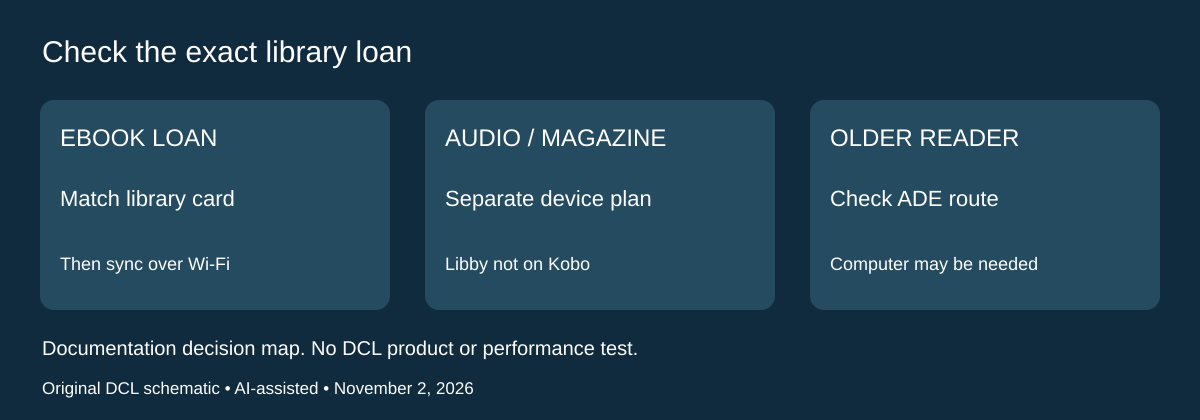
A Libby loan needs its own Kobo compatibility check
Research added November 2, 2026. Library access is not one interchangeable feature. A reader can support library ebooks without accepting every item borrowed in the phone app. If public-library borrowing is the reason to buy, use the actual loans and card you plan to take on the trip as the selection test.
Libby’s Kobo reading instructions, updated February 26, 2026, say compatible borrowed ebooks can appear after a Wi-Fi sync on supported Kobo models. That path requires the same library card in Libby and OverDrive on the reader. The page explicitly excludes Libby audiobooks and magazines from Kobo support and warns that some ebook loans will not sync. This is a service/content restriction, not proof of faulty hardware.
| What you want to take | Check before choosing the reader | Drawback or fallback |
|---|---|---|
| An ebook borrowed in Libby | Exact loan compatibility, supported Kobo, matching card, Wi-Fi sync | Do not assume every borrowed title will appear |
| A loan made with another card | Which card is actually linked on the reader | A phone’s borrowing state is insufficient evidence of reader delivery |
| Libby audiobook or magazine | Use a service-supported device for that content | Kobo library-ebook support does not cover these formats |
| An older Kobo | Investigate the documented Adobe Digital Editions transfer route | A computer and authorization workflow may be needed |
Libby describes Adobe Digital Editions as a route for older Kobo devices. Keep the computer and protected-book checks above: the existence of a fallback does not establish that your particular loan, operating system and authorization are ready. Avoid resetting a working device or buying a second reader until the failed step is identified.
Our suggested pre-trip check is to borrow one representative ebook with the intended card, sync the actual reader over Wi-Fi and confirm it opens. Do this while you can still contact the library. Keep audiobook and magazine plans separate, and verify downloads in the supported app you will actually use. These are reader preparation steps, not tests performed by DCL or promises about offline access after a loan expires.
Budget and drawbacks: reader, computer access and any second listening device have unknown current totals. A working phone app may already cover the content mix that matters most. A dedicated reader earns its place when the specific supported ebook workflow and reading experience fit your needs, rather than because a general “library compatible” label sounds comprehensive. This source-only addition approves no new device revision, retailer, subscription or library membership. It does not promise broader multi-card synchronization, audiobook transfer or access to every library’s catalog.
Choose around PDF navigation before paying for another e-reader
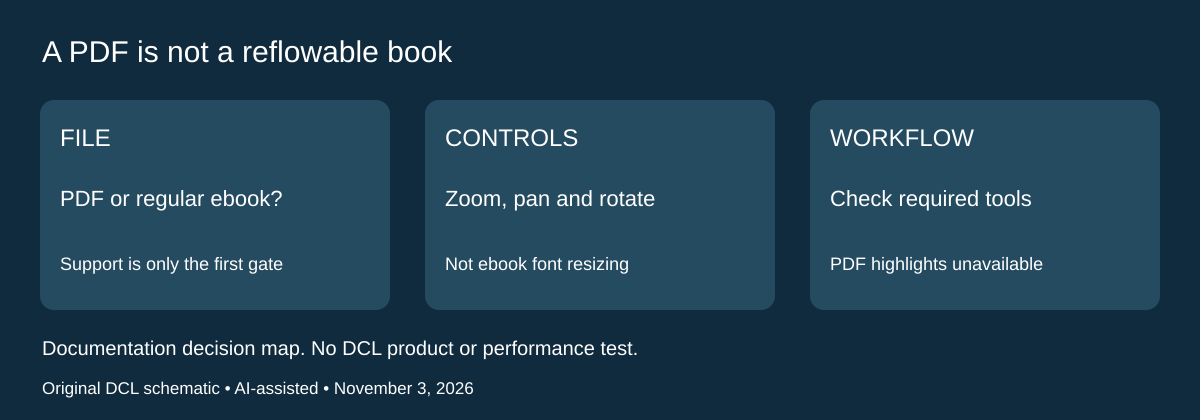
For a trip built around manuals, forms or other PDFs, file-format support is only the first decision. Kobo’s PDF navigation instructions, checked November 3, 2026, describe a different workflow from regular ebooks. Evaluate that workflow with a permitted representative file before assuming the Clara BW comparison above answers your document-reading needs.
| Required PDF task | What Kobo documents | Drawback to evaluate |
|---|---|---|
| Make a page easier to inspect | Zoom with the slider or pinch, then pan across the page | Magnification can add navigation between regions |
| See a wider part of the document | Rotate the PDF 90 degrees from the reading navigation menu | Landscape is a PDF control here; it does not establish general automatic screen rotation |
| Change type size or style | Kobo lists this as unavailable for PDF books | Do not equate zooming with ebook font adjustment |
| Highlight, select text or use the dictionary | The same page lists these as unavailable for PDF books | A readable file may still lack the study tools you require |
Kobo explains that page turning changes when a PDF is magnified: shift to the page edge before tapping left or right, or use the navigation bar. These are the maker’s documented controls, not DCL’s assessment of speed or comfort. The page describes Kobo’s reader workflow; it supplies no Kindle PDF comparison and does not establish identical behavior in another app or third-party reading software.
Our suggested selection check is to take a document with the page layout you expect to carry. Try reading a full page, locating a small detail and moving to the next page. Separately check whether the job requires text selection, highlights or dictionary lookup. This rehearsal is buyer advice; we have not tested a Clara BW with your documents. Do not infer that transferring a PDF successfully makes it a good substitute for a reflowable ebook or an annotation tablet.
Budget and drawback: retain a computer or tablet already available if it meets the document task more directly. Current reader and accessory totals remain unknown. If books dominate the trip, the existing ecosystem comparison still matters; if fixed-page documents dominate, navigation and missing tools may be the deciding limitation. Choose another device only after checking its actual documented workflow and your representative file. No page-rendering benchmark, eye-comfort claim, guaranteed layout fidelity or new paid-conversion service is assumed.
Shop the researched models
These Amazon links are affiliate links. Daily Carry Lab may earn a commission from qualifying purchases. Match the model and included contents to your needs; this guide is based on manufacturer-source research, without hands-on testing.
-
Kindle Paperwhite 12th gen 16GB (black, ad-supported)
Check Kindle Paperwhite 12th gen 16GB (black, ad-supported) on Amazon -
Kobo Clara BW (black)
Check Kobo Clara BW (black) on Amazon
Sources and limits
This guide compares published specifications and source documentation. Daily Carry Lab has not performed hands-on tests of the products in this guide. Consult the dated sources and verify the exact model and current terms before buying.
- kindle-identify primary documentation
- kindle-manual primary documentation
- kobo primary documentation
- kobo-formats primary documentation
- kindle-library primary documentation
- kobo-borrow primary documentation
- kobo-desktop added primary documentation
- kobo-usb added primary documentation
- kobo ownership and setup documentation
- Plan audiobook downloads and Bluetooth output before leaving Wi-Fi primary documentation
- Wet and sandy reading versus the waterproof label primary documentation
- October 30 decision update primary documentation
- Libby Kobo instructions: same-card sync, format exclusions and older-reader ADE route
- Kobo PDF restrictions, zoom/pan, page turning and 90-degree rotation
Related guides
iPhone 18 Pro: Wrist Strap or Crossbody Strap, with the right case
Compare exact Apple Wrist and Crossbody strap packages for iPhone 18 Pro by attachment, length, complete cost and limitations.
Portable label makers: choose phone control or a built-in keyboard
Compare Brother PT-P300BT CUBE and PT-H110 by phone dependence, TZe tape widths, power and cable-label workflow.
Travel AA/AAA chargers: match the cells, slots and USB input
Compare four-slot AA/AAA charging systems by exact chemistry and USB input. Includes conditional XTAR BC4 research and explicit operating-manual limits.
USB-C bike front lights: compare modes, mounts and charging
Compare Lezyne Micro Drive 800+ and Fenix BC15R using exact modes, rated runtime, battery design and mounting limits, without road-certification claims.